Accounting, CRM and spreadsheets that never match?
Your data lives in five places. It should live in one.
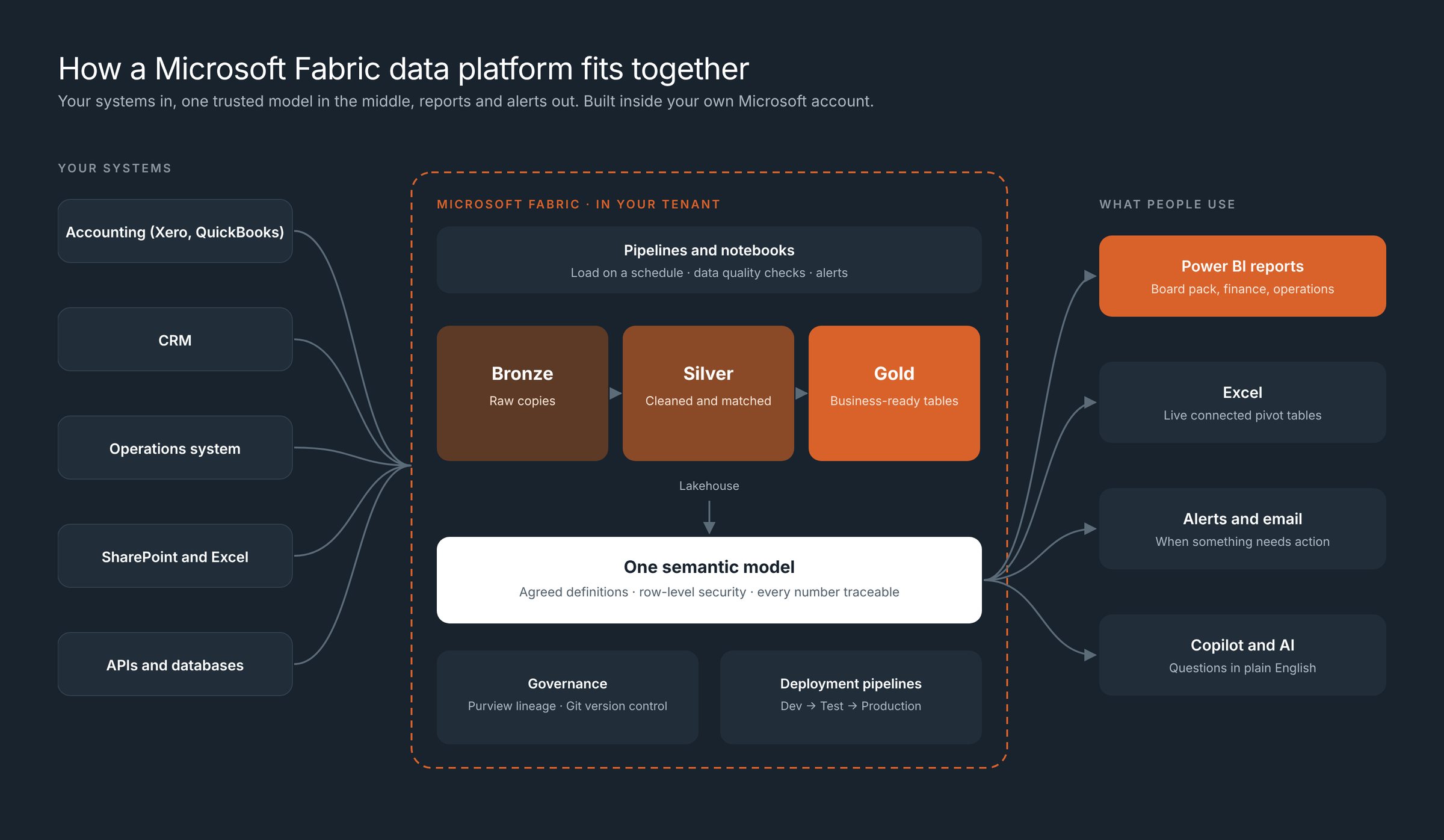
You can't manage what you can't see. Microsoft Fabric puts your accounting, CRM, spreadsheets and operations data on one governed platform. Every report, and Copilot on those reports, reads the same reliable, trustworthy numbers: one source of truth. We set it up at a size that fits a business without an IT team.
Fabric in plain words
Three ideas are all you need
OneLake is the OneDrive for your data
That is how Microsoft describes it. One place for all business data, one copy, shared safely across the business.
Shortcuts connect data where it sits
Read data from Azure, AWS, Google Cloud, Snowflake or your own servers without copying or moving it.
Mirroring keeps a live copy in sync
A database can be reflected into Fabric and kept up to date, with no pipelines to build or maintain.
The foundation, layer by layer
AI is only as reliable as the foundation under it
We build from the bottom up. Skip a layer and AI guesses.
- 4We buildCopilot on your Power BI reports, with plain-word descriptions on every number
Ready for AI
AI is only as good as the data under it. Copilot answers from the layers below, so its answers can be checked.
- 3We buildSemantic model, measures, row-level security, Purview lineage
Define the meaning
Each number defined once, in plain words, with rules for who can see what.
- 2We buildData Factory pipelines, bronze/silver/gold layers, data health checks and alerts
Clean and combine
The same customer, account and date mean the same thing in every system.
- 1We buildOneLake, shortcuts, mirroring, scheduled loads
Bring it together
Every system lands in one governed place, without copies everywhere.
This is the same order Microsoft uses for Fabric IQ: unify the data, harmonise it and add business meaning. AI is added on top, not underneath.
Your team and AI need the same thing
One source of truth, with clear meaning. Build it once for your people, and it is ready for AI when you are.
- What our numbers mean
- Where the data lives
- What they are allowed to see
- How we do things here
- Measures defined once, in plain words
- One governed copy in OneLake
- Row- and column-level security
- Business rules in the model
Three questions, one platform
Most reporting only answers the first. Fabric answers all three from the same data.
What happened?
History in OneLake and Power BI. Month-end that builds itself and matches the ledger.
Month-end reportingWhat is happening?
Real-Time Intelligence watches the data and acts when a rule is met.
Multi-site reportingWhat should happen?
Planning in Fabric keeps budgets, forecasts and actuals on one shared model, so you can see ahead, not just look back.
Budgets and cash flowSecurity your team and AI respect
Open data for your people. Locked down where it matters.
Most businesses want two things that pull against each other: everyone using data, and sensitive data kept safe. Fabric lets you have both, and we set it up and test it before anyone asks AI a question.
Is Fabric right for you? An honest answer
Fabric makes sense when:
- You combine three or more systems
- Power BI alone is getting slow or hitting limits
- You need history and an audit trail
- You want Copilot on your reports
Power BI alone is enough when:
- You have one or two data sources
- You need a few reports, refreshed daily
We will tell you which on the free call, even if the answer is the smaller job.
Start small, grow when it pays
No big-bang migration. One question, one or two sources, then build on it.
Free call
Is Fabric right for you? Running cost estimated.
Pick one question
The one that costs you most time or money.
Pilot
One or two sources, estimated upfront, working in weeks.
Grow
Add systems and AI on the same foundation.
Proof
Built on the platform big business already trusts
Power BI is used by more than 35 million people and by 93% of Fortune 500 companies (Microsoft). We bring the same platform to businesses without an IT team, built properly and handed over.
Questions about Microsoft Fabric
What is Microsoft Fabric, in plain words?
One Microsoft platform where all your business data lives, gets cleaned and is turned into reports and AI answers. Microsoft calls its storage layer, OneLake, the OneDrive for data: one place, one copy, shared safely across the business. Power BI is part of Fabric.
Does a small business need Fabric, or is Power BI enough?
Often Power BI alone is enough. Fabric pays off when you have three or more systems to combine, data that is too large or slow for Power BI on its own, a need for history and audit trails, or plans to use Copilot on your reports. We tell you which on the free call.
Do we have to move all our data into Fabric?
No. Shortcuts let Fabric read data where it already sits, in Azure, AWS, Google Cloud, Snowflake, Databricks or on-premises, without copying it. Mirroring keeps a live copy of a database in sync with no pipelines to build.
Will our data be ready for Copilot and AI later?
Yes. The model your reports use gets agreed definitions, plain-word descriptions, tested security and data health monitoring. We can set up Copilot on your Power BI reports, and it answers from those checked numbers with the same access rules as your reports.
How much does Fabric cost to start?
Fabric is billed by capacity, and the right size depends on your data and users. Smaller capacities can be paused when not in use, and many businesses start with a pilot on one or two sources. We estimate the running cost on the free call, and our own work starts from AUD 90 an hour, with a written estimate agreed before we start.
We already use Power BI. What changes?
Your reports keep working. Fabric adds a governed place underneath them to bring data together, clean it and keep history, so the same reports become faster, easier to trust and ready for Copilot.
Which systems can you connect to Fabric?
Xero, QuickBooks, Dynamics 365, CRMs, SQL databases, SharePoint, Excel, Google Sheets, BigQuery, Shopify and most systems that can export or share data.
Find out if Fabric is right for you.
A free 30-minute call. You get an honest answer, an estimate of the running cost, and what the first step would be.